
Showing posts with label Gear. Show all posts
Showing posts with label Gear. Show all posts
Sunday, January 5, 2014

Sunday, December 8, 2013

Monday, September 23, 2013
Ocean Pacific - New Guitar Part!

I've been struggling with this one to get just the right added guitar part, guitar tone. At :50 you can hear the new part (I've also marked it on the soundcloud file). I'm playing two new chords over the existing parts and it seems to work really well harmonically.
-----------------------
Below is the previous version for reference. The guitar part at :50 is what to listen for in this older version. I may have also brought the drums down a pinch on the new mix. The felt a little loud coming in on this one.
Saturday, February 2, 2013
What I learned at Winter NAMM 2013
I haven't been to a NAMM show in probably a decade. The last time I went it was in Los Angeles, maybe 2002 or 2003.
I used to enjoy the show a lot in the 90s as the DAW technology was evolving and there were new and interesting synths and software. These days, it seems not much has changed in a decade, but here are some highlights!


I used to enjoy the show a lot in the 90s as the DAW technology was evolving and there were new and interesting synths and software. These days, it seems not much has changed in a decade, but here are some highlights!

You probably can't tell from the photo, but that's an iPad that inserts into the body of a "Keytar" controller. Novel for guitarists who don't want to learn how to play keys and I'm sure this helps justify the cost of a new iPad!

When I saw this six string electric violin I wondered if it was tuned like a guitar, like Jonathan Wilson's "Guitar Viol." But it's not. It's tuned like a Violin with two strings added.

I learned that you can buy a brand new Martin Acoustic D-455 Authentic 1936 for $59,999.

I also learned I can buy a brand new Matin DRS2 for $1,000...

Trussart Steelcaster Lust. God knows I don't need any new guitars, but man do I want one of these!

I have no idea what these sound like. You can't hear anything meaningful on the NAMM floor. But this line of Pan Asian pedals by Mooer is pretty cool. All pedals are under $100 list.

Just what the world needs. A $40 wholesale knock off strat. Booyaah!

One of the cooler things in the basement. A trippy ribbonish synth type instrument/controller into some kind of electric gong/cymbal. An essential for the electro/world nu-age artist.

Can there ever be to many vintage neve knock-off clones? And now in a 500 series...

This is tight. The Roland "V-Synth" Series Electric/Synth Accordion. Don't play in the rain.
Friday, October 26, 2012
The Work Room 2012
View From The Studio Door

View From The Amp Closet

The Guitar Effects Racks

The Amp Closet

Sunday, October 7, 2012
Big Sur : Wide Guitars Demo Sketch (Soundtoys Crystallizer)
This is how a lot of my tracks start. Just a basic drum loop and then I find a couple chords I like and just try to play them well enough to get a decent rhythm track down. Once that's done, I'll double (or in this case copy) the part and try to add some space to it by effecting it and hard panning the two tracks.
You can see from the screen shots below this is really just the bare minimum to get the raw idea out. A lot of my process is trying to find a vibe. Recording for me is a lot like sculpture as I try to figure what to take out to make room for other parts and ideas.
In the tracking screen shot here there's only 4 parts comprised of six channels of audio total:
1) Drums from Toontrack's Superior Drummer - Stereo
2) The basic rhythm part played on the Telecaster recorded - Mono
3) The duplicate (copy) of the rhythm part w/ SoundToys Crystalizer added - Mono
4) Effects Returns of the basic rhythm part processed in Eventide Effects - Stereo


You can see from the screen shots below this is really just the bare minimum to get the raw idea out. A lot of my process is trying to find a vibe. Recording for me is a lot like sculpture as I try to figure what to take out to make room for other parts and ideas.
In the tracking screen shot here there's only 4 parts comprised of six channels of audio total:
1) Drums from Toontrack's Superior Drummer - Stereo
2) The basic rhythm part played on the Telecaster recorded - Mono
3) The duplicate (copy) of the rhythm part w/ SoundToys Crystalizer added - Mono
4) Effects Returns of the basic rhythm part processed in Eventide Effects - Stereo

In the mixing screen shot you can see minimal use of effects plug ins and eq to just give the track enough vibe to start figuring it out.
Some of these old projects I'm opening up for this blog were recorded in previous versions of Sonar. So when I'm opening them in X1 I'm having to do a little tweaking to adjust the project from previous settings which may have included plugins I'm no longer using.
One of the really nice things about Sonar X1 is the Pro Channel with compression and EQ on each channel. I also like the way Sonar expands and collapses the channel strip. The compressor allows you to toggle between a sorta 1176 Compressor model and an SSL 4000 series compressor model. The EQ settings also provide three options of "Pure", "Vintage", and "Modern." I'm assuming that Pure is completely digital with no coloration, "Vintage" is some version of a Neve 1073 (I'd hope) and "Modern" is SSL.

This particular project is using two plugins from my UAD-1 card. Generally speaking, I find the UAD plugins to be the best sounding to my ears. On the Drum Buss I disabled the AUD Roland Space Echo, but I'm still using the UAD LA2A compressor and the UAD RealVerb.
My Guitar Buss Compressor of choice is the Waves Ren Comp. It just works for me. And finally on the 2 Buss is the tried and true Wave L2 limited for quick and dirty leveling. All of the EQ on this demo track is the Sonar native EQ within X1.
It may be interesting to listen to the Demo Sketch of Big Sur above, and then listen to this completed version of the song with added Lap Steel, arrangement changes, and effects editing.
Saturday, October 6, 2012
Review and Demo : Rogue AE-3 Lap Steel Basics
For $99 from Musicians Friend you can't really complain about this little wonder! The Rogue AE-3 Lap Steel is a great buy for experimenting with the lap steel / pedal steel sound.

You'll note that I've tuned the Lap Steel to Open G, which allows for the strumming of a few major chords across all strings when using a slide. Referring to my favorite chords/scale website Guitar Chords Magic you can see that the Dmaj chord below is comprised of the notes D, F# and A which are all played while barred with the slide across the 7th fret. I can play the Cmaj chord while playing the 5th fret, and I can play the Gmaj chord on the 12th fret.
The minor chords in the scale of Gmaj require moving the slide down one fret on the note that is the third in the chord. I don't know that people really strum a pedal steel, so this is good starting place to practice small moves between the major and minor chords.

Using my other favorite website, Bob Craypoe's Dr. Psychotic, here's what chords in the key of Gmaj look like in Standard Tuning, say on my Telecaster (pictured above).


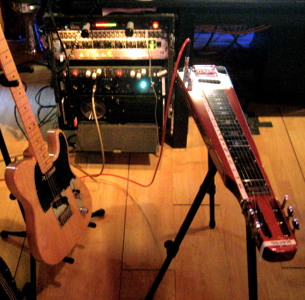
Below are two songs I recorded using the Rogue, see what you think. The Lap Steel was routed through an effects rack to a Fender Pro Jr amp, mic'd with an SM57. From there the mic was run into a Universal Audio 2-610 pre-amp, then to a Emperical Labs Distressor and finally an Apogee Rosetta 800 / RME 9652. My recording program of choice is Sonar, now into version X2. I'm still very happy with version X1 and this recording was most likely done in version 6.
I'll post tracking and mixing screen shots of the sessions soon. If I have time I'll also print these projects as stems for anyone who wants to dig deeper into them and hear the tracks in isolation.
You'll note that I've tuned the Lap Steel to Open G, which allows for the strumming of a few major chords across all strings when using a slide. Referring to my favorite chords/scale website Guitar Chords Magic you can see that the Dmaj chord below is comprised of the notes D, F# and A which are all played while barred with the slide across the 7th fret. I can play the Cmaj chord while playing the 5th fret, and I can play the Gmaj chord on the 12th fret.
The minor chords in the scale of Gmaj require moving the slide down one fret on the note that is the third in the chord. I don't know that people really strum a pedal steel, so this is good starting place to practice small moves between the major and minor chords.

You can see how to play more chords in Open G tuning here at Jamplay.com.
Using my other favorite website, Bob Craypoe's Dr. Psychotic, here's what chords in the key of Gmaj look like in Standard Tuning, say on my Telecaster (pictured above).

Monday, September 24, 2012
Ocean Pacific : New Song, New Genre "Ambient Groove"
[UPDATED WITH STEMS 10.01.12]
New Song, "Ocean Pacific." Detailed recording notes forth coming... New Genre "Ambient Groove" combines Ambient Guitar with Electronic Rhythms. Enjoy.


New Song, "Ocean Pacific." Detailed recording notes forth coming... New Genre "Ambient Groove" combines Ambient Guitar with Electronic Rhythms. Enjoy.
DOWNLOAD STEMS:
The file will be deleted on October 16, 2012.
Sonar X1 Session Tracking

Sonar X1 Session Mixing

GUITARS:
- American Telecaster
- Les Paul 56 Goldtop Re-issue w/ P90s & Bigsby
IN LINE EFFECTS (in varying combinations):
- Korg SDD 3000
- Lexicon Primetime 93
- Xotic EP Booster
- Fulltone OCD
- Ibanez Tube Screamer
- Zvex Fuzz Factory
AMPS:
- Egnater Rebel 20 -> Orange 1x12 -> Heil PR30
- Vox AC4TV -> Blue Baby Bottle
- Fender Pro Jr. -> Shure SM57
PRE-AMP/COMP:
- UA 2610 -> Distressor/s x2 (Usually just this chain)
- Vintech Dual 72
- Vintech 273
HARDWARE POST EFFECTS (Printed to Stems):
- Eventide Eclipse -> TC D-TWO -> PCM 91 -> SPL TD2
- Eventide H3000
- Yamaha SPX90II
SOFTWARE EFFECTS/PLUG INS:
- SoundToys EchoBoy
- SoundToys Crystalizer
- SoundToys Decapitator
- SoundToys Devil-Loc Delux
- Voxengo Perfect/Pristine Space
- Waves Renaissance Compressor
- Waves L2 Limiter
SOFTWARE EFFECTS/PLUG INS:
- SoundToys EchoBoy
- SoundToys Crystalizer
- SoundToys Decapitator
- SoundToys Devil-Loc Delux
- Voxengo Perfect/Pristine Space
- Waves Renaissance Compressor
- Waves L2 Limiter
Manhattan Sunset : Production & Stems (Ambient Groove)
I made a couple subtle changes on this mix that make it slightly different than the previous version posted. When I went back into the old project file to export the stems for this experiment I found a muted guitar part that I decided might be interesting to work in - so that's now added. I also tweaked the mix slightly.
None of this really makes up for my generally sloppy playing, but hey, that's why we have computers and effects, right? One other quick note is that this track still does not have a bass line. I'll probably end up doing one more pass at some point with either electric bass or a synth bass, we'll see... until then here it is...
Manhattan Sunset (Stems Mix) 09.21.12


None of this really makes up for my generally sloppy playing, but hey, that's why we have computers and effects, right? One other quick note is that this track still does not have a bass line. I'll probably end up doing one more pass at some point with either electric bass or a synth bass, we'll see... until then here it is...
Manhattan Sunset (Stems Mix) 09.21.12
Download the stems at the link below via WeTransfer (which is an elegant and great service). This download expires on Sunday October 8, 2012. Hopefully by then I'll figure out a long term solution for free file hosting. If all else fails, I suppose there Bit Torrent.
The song is pretty minimal as follows:

Track 01 :
Drum Loop 01 [stereo]
- Just a loop I found interesting from one of my libraries. I don't remember the details entirely but it sounds like I processed/modified it in Dr.Rex in Reason. I have a few tricks which I'll discuss in another post. This loop provides the rhythmic foundation for the song. I added some reverb directly on the channel insert in Sonar using the Audio Damage reverb plug-in Reverence. For the record, I love the Audio Damage line of plug-ins. This plug-in is now called ADverb and is only $39. It's a steal. ADverb is loosely based on the Lexicon 200 reverb which you can see [here].
Track 02 :
Drum Loop 02 [mono]
- This is actually from a vintage Korg 33 Rhythm machine. You can see some cool pix of it at Matrix Synth. I had just bought this from a local music store that sells a lot of odd, old and vintage gear so I wanted to use it. I had to play with the tempo to get it close enough that I could make a loop at 85 bpm to march the song. Other than rolling off some of the high frequencies to reduce noise from the machine this track is pretty dry.
Track 03 :
Acoustic Guitar [mono to stereo]
- The true inspiration for this song was the recent purchase of an Epiphone Masterbuilt AJ-500ME acoustic/electric guitar. I was eager to record it direct via it's electronics which is how this was recorded. The guitar was recorded mono direct, but the track is in stereo because of mono to stereo spread that happens when I inserted the SoundToys EchoBoy delay plug-in. The track get's a good dose of compression from a UAD ll76LN plug-in, prior to EchoBoy. Sound Toys are my absolute favorite plug-ins for work in the box and EchoBoy is probably my most used (and abused) of them.
This song is really just me banging out some chords on the Epiphone as a recording test (which most of demos tend to be, recording tests!). The progression is a simple Two Chord Wonder of Dmaj to Amin, inspired (very roughly so) from the U2 song "In God's Country." I will confess that I looped this performance.
Track 04 :
Electric Guitar 01 [Mono]
- Mostly likely an Epiphone Les Paul. All the effects and amp tone you hear are all in the signal chain for better or worse. If memory serves (and I should take better notes) it was most likely something like this :
Epiphone Les Paul -> Korg SDD 3000 -> Epiphone Valve Jr -> Sennheiser e906 on grill -> UA 2-610 Mic Pre -> Empirical Labs Distressor -> Apogee Rosetta 800 -> RME 9652 -> Sonar DAW
Track 05 :
Electric Guitar 02 [Mono]
- The same as Track 4. This second part is played a little differently to a allow a little space. The signal path should be identical. I may have switched the pick ups for this second take. The guitars are hard panned to create space. I also should note that the Epiphone Valve Jr is a really underrated low wattage tube amp. Five watts, one knob, no clutter.
Track 06 :
Electric Guitar EFX Returns [stereo]
- You can't see it in mix window screen shot below, but in the original set up and mix of this song guitar from Track 05 is sent out of the computer to a rack of effects. The return from those effects are then printed into this track, and manipulated. Printing the effects return as their own tracks, 100% wet is an old Brian Eno & Daniel Lanois studio trick. The signal chain for the effects is something like this:
Sonar Track 04 Send Out Channels 7/8 via Apogee Rosetta 800 -> Mackie 1604 VLZ as Effects Matrix -> Eventide Eclipse -> TC Electronics D-Two -> Lexicon PCM 91 - > SPL Transient Designer -> Mackie 1604 VLZ as Effects Matrix -> Return to Sonar on Input Channels 7/8 via Apogee Rosetta 800
At some point I'll post a flow chart for how the Mackie is used as an Effects Matrix which now includes an Eventide H3000 and a Yamaha SPX 90II. I also use the Mackie as my primary Keyboard/Synth submixer to simply inputs to the Rosetta 800.
Track 07 :
Clean Guitar [mono to stereo]
- Sometimes I keep old parts in and just mute them. As in this case when I opened the project to make these stems I found an old guitar part that was muted, so I listened to it and thought... hmmm, maybe try to find a place for it. The part is pretty rough, and I can see why I didn't use it. But for the sake of this experiment I put it back in. What you hear is pretty much the track as it was recorded processed with the new Pro Channel in Sonar X1. I'm using the "76" compressor to try and level it out a bit, the EQ to roll off the low end and build a shelf to get this to sit better in the mix. Last but not least is the SoundToys Crystalizer plug-in using the "Doubler" preset without much tweaking.
The Mix Buss

Drum Buss
- UAD 1176 compressor to level out the two drum loops and make them more consistent.
Guitars Buss
- Generally speaking I like to use the Wave Renaissance compressor on the guitar buss. I'm not sure why I didn't here, but it sounds OK to me.
Master Buss
- I'm using the "4k" compressor in Sonar X1, as well as the EQ. I've tried to "sweeten" the mix a little here as faux mastering. The Flux Stereo Tool is a free useful utility for looking at the stereo width of your recordings. I try to get things reasonably wide. The last plug-in in the chain is the Waves tried and true L2 limiter, which is perhaps the most used and abused plug-in ev-er. Hopefully, I'm not guilty.
###
That's pretty much it. I've uploaded the stems as 16 bit / 44.1 wav's so that they can be imported into any DAW. I dropped them into Logic Pro on my laptop just to make sure they work (see screen shot below).

I hope this is helpful and/or informative to someone despite my limitations as both a musician and producer!
Monday, September 17, 2012
Sonar X1 : The "0" Bar and Markers Problem
I've been using Sonar recording software since version 6 in 2007. I really enjoy it and in fact find it to be a largely underrated platform for music creation. I tend not to be evangelical or obsessive about software or platforms (mac or pc). To me, these are all just tools and one should use the tools that best get the job done and aid in productivity and inspiration.
One of my pet peeves with Sonar is that projects start on the "1" bar, so any song that requires a soft lead in before the down beat of the first note is truncated. The obvious solution would be to just start on bar number "2" but this brings with it the awkwardness of having to constantly compensate for bar counts. For example, instead of 16 measures ending at bar 17, I'd have to remind myself that the first 16 measures actually end on bar 18. And, if I want to add four bars to that, instead of landing on bar 24 as would be normal, I now am ending on bar 25. Although this is not the end of the world, it is also a hassle I don't want to have to do throughout an entire project.
The second pet peeve in Sonar is the lack of song markers that are common in other programs to help quickly and easily see the different sections of a song, such as verse and chorus. By having these clear and easy to see markers the song writing processes is a lot more fluid by having a visual reference to the song parts.
In this first screen cap you can see the colored song parts start on bar #2 and represent the 8-16 measure parts of the song. Clicking on any of the "maker blocks" allows for quick and easy looping of that section.

In this second screen cap you can see a close up of the project starting on bar 1, however the markers start on bar 2. Because the markers are in sections that can be easily looped and are also in standard counts of 8-16 measures they make navigating the non-standard count of the project starting on bar 2 simple.

I hope that if you are Sonar user you find this tip helpful on your own projects. I find the use of markers in this way to be a more elegant solution than Sonar's stock marker tool.
One of my pet peeves with Sonar is that projects start on the "1" bar, so any song that requires a soft lead in before the down beat of the first note is truncated. The obvious solution would be to just start on bar number "2" but this brings with it the awkwardness of having to constantly compensate for bar counts. For example, instead of 16 measures ending at bar 17, I'd have to remind myself that the first 16 measures actually end on bar 18. And, if I want to add four bars to that, instead of landing on bar 24 as would be normal, I now am ending on bar 25. Although this is not the end of the world, it is also a hassle I don't want to have to do throughout an entire project.
The second pet peeve in Sonar is the lack of song markers that are common in other programs to help quickly and easily see the different sections of a song, such as verse and chorus. By having these clear and easy to see markers the song writing processes is a lot more fluid by having a visual reference to the song parts.
Well, lucky day. In a couple of quick steps it's more/less easy to visually solve both of these problems.You now have a basic marker from which you can copy/past for each part of your song and then colot code using the clip info in the tab.
1) Record just a second of audio, in any track.
2) Insert a Midi Track as Track "One" in your project.
3) Drag the audio clip to the midi track.
4) Using the trim tool extend the audio track.
5) Using the trim tool now truncate or trim the head of the audio track so no audio waveform is visible.
In this first screen cap you can see the colored song parts start on bar #2 and represent the 8-16 measure parts of the song. Clicking on any of the "maker blocks" allows for quick and easy looping of that section.

In this second screen cap you can see a close up of the project starting on bar 1, however the markers start on bar 2. Because the markers are in sections that can be easily looped and are also in standard counts of 8-16 measures they make navigating the non-standard count of the project starting on bar 2 simple.

I hope that if you are Sonar user you find this tip helpful on your own projects. I find the use of markers in this way to be a more elegant solution than Sonar's stock marker tool.
Subscribe to:
Posts (Atom)